Basalam orders arrive in the panel on their own
Connect your Basalam shop and every order is filed with its buyer as a customer, and becomes an order on your board or a paid invoice. Tell Basalam a parcel is being prepared, or posted with its tracking code, from the same screen, and keep Basalam's prices and stock in step with your catalogue.
Product update 3 min read
What changed
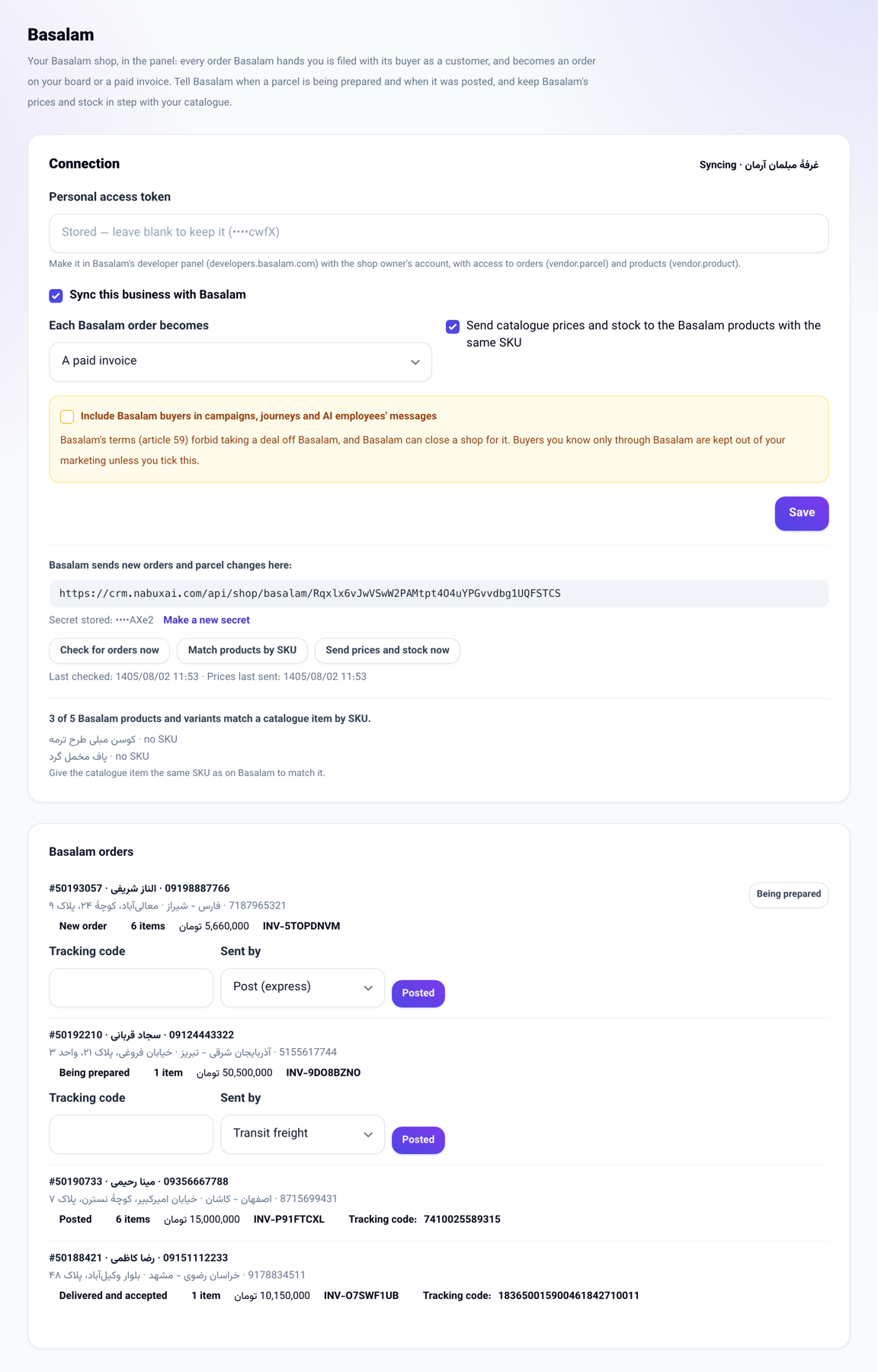
If you sell on Basalam, you no longer type its orders into the panel by hand:
- A new Basalam order is in the panel moments after it is placed. The buyer is filed as a customer with their name, mobile number and postal address, under the source Basalam.
- The order lands on your order board if you work the board, and otherwise becomes an invoice paid through the payment mode Basalam, because the buyer has already paid Basalam.
- Its items are matched to your catalogue by SKU, and an item linked to the storeroom leaves the stock. An item with no matching SKU is written with its Basalam name.
- You tell Basalam a parcel is Being prepared, and that it was Posted with its tracking code and carrier, from the same screen. An order on the board that you start preparing is reported to Basalam too.
- If you want, your catalogue's prices and stock go to the Basalam products with the same SKU every fifteen minutes.
- An order Basalam cancels is undone here as well: the stock goes back on the shelf and its invoice gets a credit note.
How to use it
- In Basalam's developer panel (developers.basalam.com), signed in as the shop owner, make a personal access token with access to the shop's orders and products.
- In the panel, open Contacts and leads → Online shop and go to the Basalam tab.
- Paste the token into Personal access token, tick Sync this business with Basalam and press Save. The panel subscribes Basalam's order webhooks for you.
- Under Each Basalam order becomes, choose an order on the order board, a paid invoice, or whichever this business uses.
- To send prices and stock, give your catalogue items the same SKU as on Basalam, press Match products by SKU, and tick Send catalogue prices and stock to the Basalam products with the same SKU.
- The orders are listed below. Press Being prepared for each one, and once it is with the carrier write the tracking code, choose how it was sent and press Posted.
Good to know
- Basalam's terms (article 59) forbid taking a deal off Basalam. So buyers you know only through Basalam are kept out of your campaigns, customer journeys and AI employees' messages, unless you tick the switch that warns about it. A customer who also reached you another way stays a customer like any other. Automation rules you write yourself are not filtered.
- If Basalam refuses the webhook subscription, the address and its header are on the same screen so you can paste them into Basalam's panel. Basalam is also checked every fifteen minutes, so no order is missed.
- Basalam's amounts are in rial; the panel writes them in toman. Basalam's commission is not taken off the invoice.
- The token is kept encrypted and only its last four characters are shown, here and in the Connections book.
- Only somebody who manages the business can change the connection; anybody who edits customers can move the orders along.
- You can also ask the console about today's Basalam orders, or give it an order's tracking code. Anything told to Basalam waits for your approval card first.