The customer history's counts read correctly

The history filter buttons on a customer file show their count in a small badge. In Persian and Arabic the separating dot used to sit beside the number and look like a zero, so 7 calls read as "70".

Product update 1 min read

What changed

  • Each button's count is in its own badge. "All", "Notes", "Calls" and the rest show their number in a round badge beside the name. Before, a "·" separated them, and in right-to-left text it landed beside the number where it looks like a Persian zero, so seven events read as "۷۰".
  • "7 events" in the reader's digits and joined letters. The counter was set in a font with no Persian or Arabic letters; it now uses the panel's own.
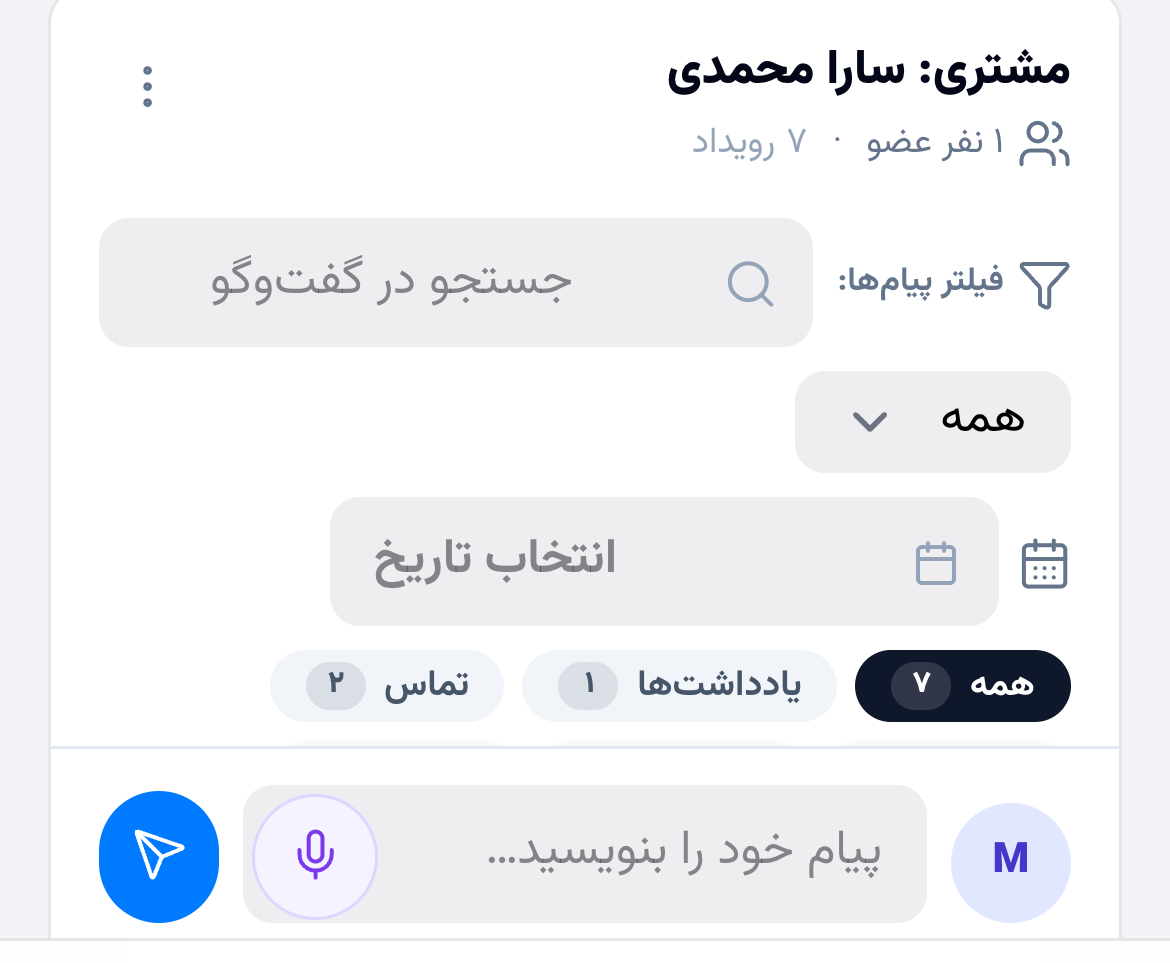
The customer history

Good to know

  • The filters work as before; only how the numbers are drawn changed.

More from the blog

Product update

A shorter, tidier phone menu

The phone menu is no longer four screens of tiles. The section you are in stands open and every other section is one row with its icon and count. Search leads the menu and the foot is one row.

Product update

The sidebar menu is on the first screen

The welcome card and \"Worth a look\" are one row each now, section headings wear icons, and a section you open stays open. \"My messages\" left the middle of the page: its bell sits beside the voice button in the sidebar.

Product update

The "My messages" bell is back where it belongs

In the macOS skin the bell now sits in the top bar beside the mic and the other buttons, and its list opens right under it instead of taking a row of its own above the page.

Missing something?

Tell us what to build next. Most of what is announced here started as somebody’s suggestion.

Suggest a feature