Bring your customers across from Mizito, Hesabfa or any Excel file
Give the import page a Mizito export, a Hesabfa people list or any Excel or CSV file. Columns are recognised for you, you see how many customers are new and how many you already have before anything is filed, and nobody is filed twice.
Product update 2 min read
What changed
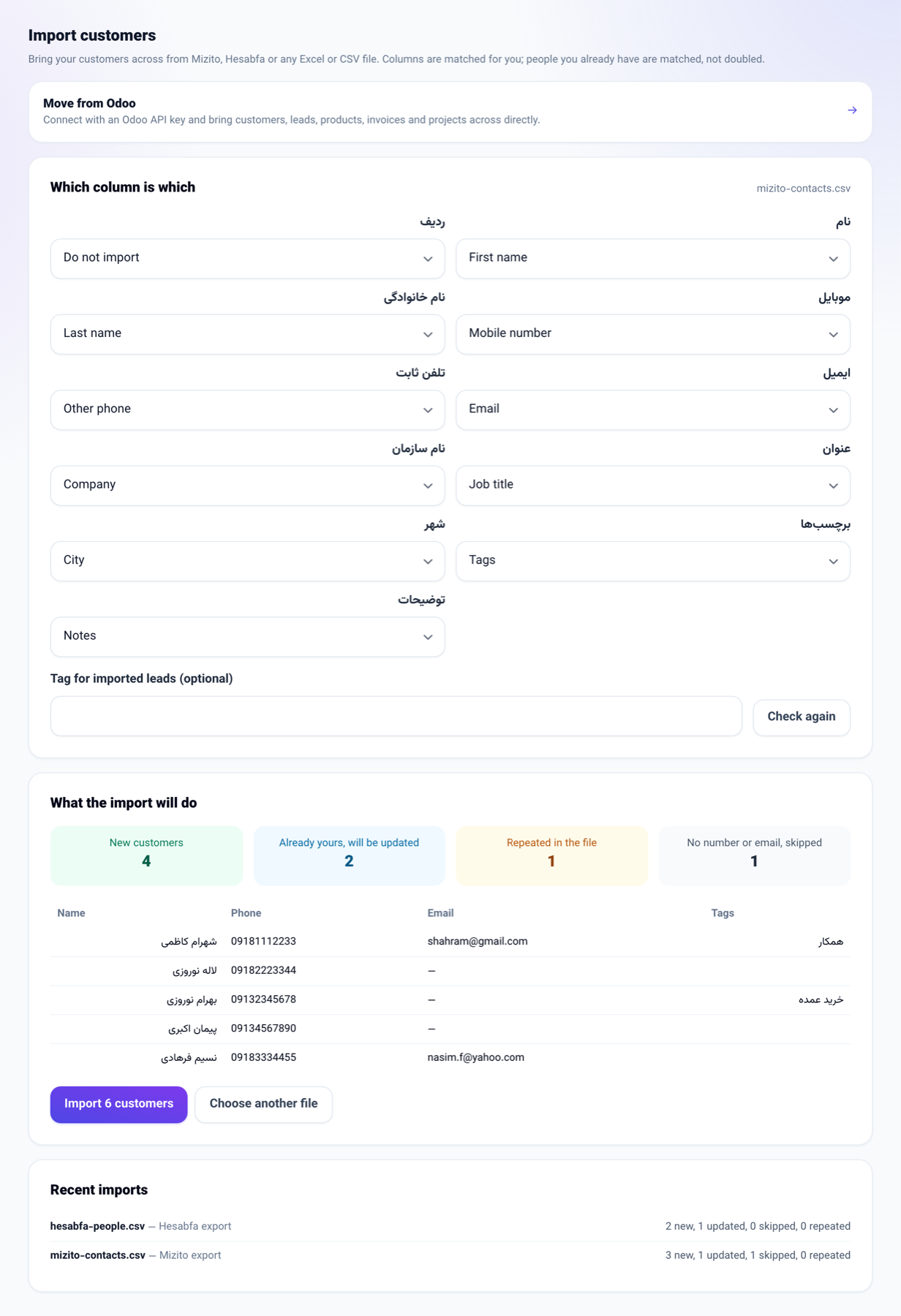
The Import (AI/MCP) page now actually imports:
- It reads .xlsx and CSV files, with Persian column titles the way Mizito and Hesabfa export them. A CSV saved by Excel on a Persian Windows reads correctly too.
- It works out what each column is: name, first and last name, mobile, other phone, email, company, job title, city, address, national or economic ID, tags, notes, or one of your own custom fields. A column it cannot place is asked of the AI with only its title and the shape of its values — never your customers' details.
- Before importing it shows how many customers are new, how many are already yours and will be updated, how many rows repeat in the file and how many have neither a number nor an email.
- The import runs in the background and its result stays under Recent imports. The file is deleted from the server once it has been imported.
How to use it
- Open Business settings → Business profile, and the Import (AI/MCP) tab.
- Choose where the file comes from: Excel or CSV file, Mizito export, or Hesabfa export.
- Choose the file and press Read the file.
- Check the columns, change any that are wrong, and press Check again.
- Type a tag if you want to find this batch later.
- Press Import N customers.
Good to know
- In Mizito, export from the contacts list; in Hesabfa, export the people list to Excel. The first row must be the column titles.
- Up to 5,000 rows are read per file; split a longer one.
- Somebody whose mobile or email matches one of your customers is not created again: only the blanks on their file are filled and the tags added.
- Imported customers are not handed to anyone; share them out among colleagues from Contacts.
- Moving from Odoo is still done from Move from Odoo on the same page.