New skin — Liquid Glass

A new panel skin — cards, bars, menus and the AI console become frosted glass over a soft colour field, in both light and dark mode.

Product update 1 min read

What changed

Next to the Mizito, Windows, macOS, iOS, Material and Odoo skins there is now a Liquid Glass theme:

  • Cards, the top bar, the sidebar, the dock and the ⌘K search become frosted panes with a lit top edge.
  • The AI console goes fully glass too — thread list, message bubbles and composer — and your own messages wear the accent as tinted glass, so the conversation stays easy to follow.
  • In dark mode the field deepens and the glass turns smoky.
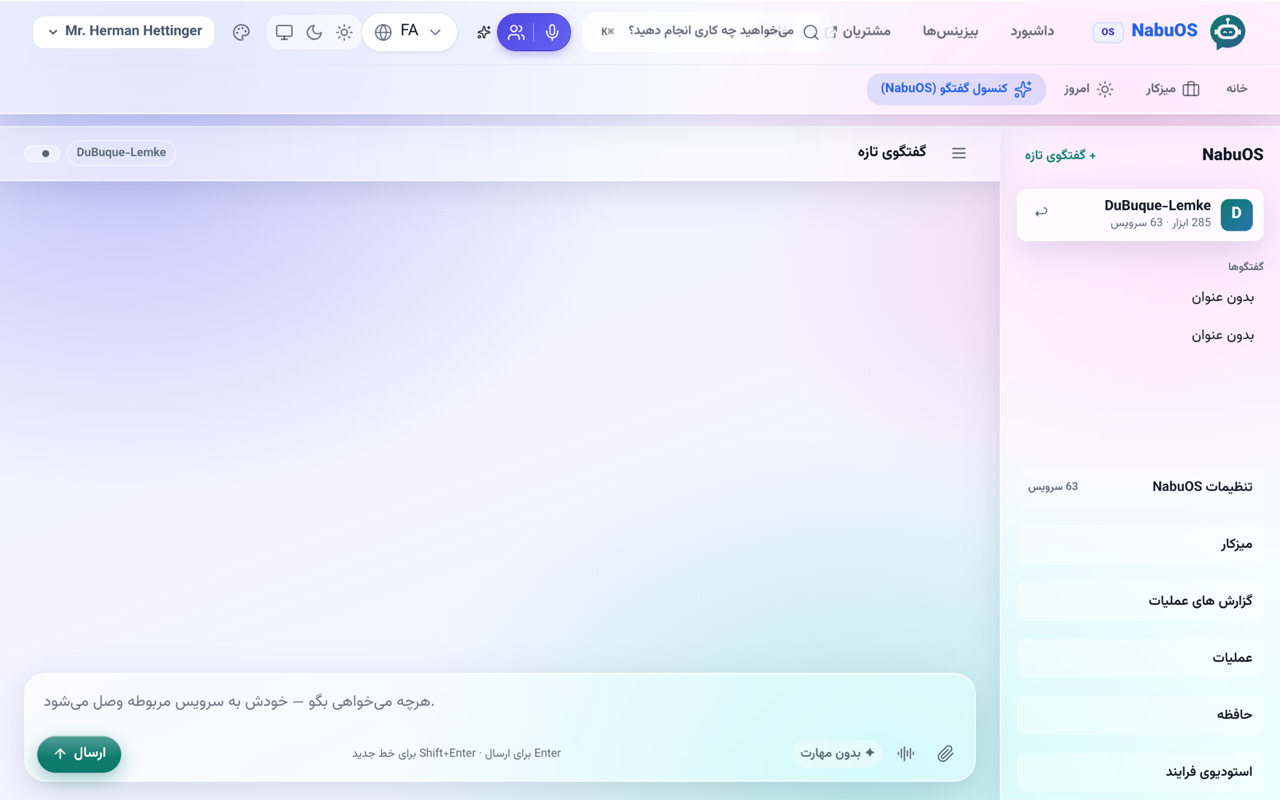
The AI console in Liquid Glass

How to use it

  1. Press the palette (panel skin) button in the top bar.
  2. Choose Liquid Glass theme.

Good to know

  • With "reduce transparency" on in your operating system, panes are drawn solid so text always stays readable.
  • The skin is per device; it changes nothing for your colleagues.

More from the blog

Product update

A shorter, tidier phone menu

The phone menu is no longer four screens of tiles. The section you are in stands open and every other section is one row with its icon and count. Search leads the menu and the foot is one row.

Product update

The sidebar menu is on the first screen

The welcome card and \"Worth a look\" are one row each now, section headings wear icons, and a section you open stays open. \"My messages\" left the middle of the page: its bell sits beside the voice button in the sidebar.

Product update

The "My messages" bell is back where it belongs

In the macOS skin the bell now sits in the top bar beside the mic and the other buttons, and its list opens right under it instead of taking a row of its own above the page.

Missing something?

Tell us what to build next. Most of what is announced here started as somebody’s suggestion.

Suggest a feature