Telegram, Instagram, Messenger and X accounts — automatic replies and sending
An account you linked on a Nabux gateway (Telegram on tm.nabuxai.com, Instagram on ig.nabuxai.com, a Facebook Page's Messenger on fb.nabuxai.com, X on x.nabuxai.com) now connects to your business the same way WhatsApp does. Customer messages are answered automatically, land in the customer file, and you can answer them from NabuDesk.
Product update 2 min read
What changed
- One card for four messengers. Business settings → WhatsApp has a new Telegram, Instagram, Messenger and X accounts card, under the WhatsApp gateway card. Pick the messenger, paste the personal key you made on its gateway, press Show my accounts, pick the account and press Connect this account.
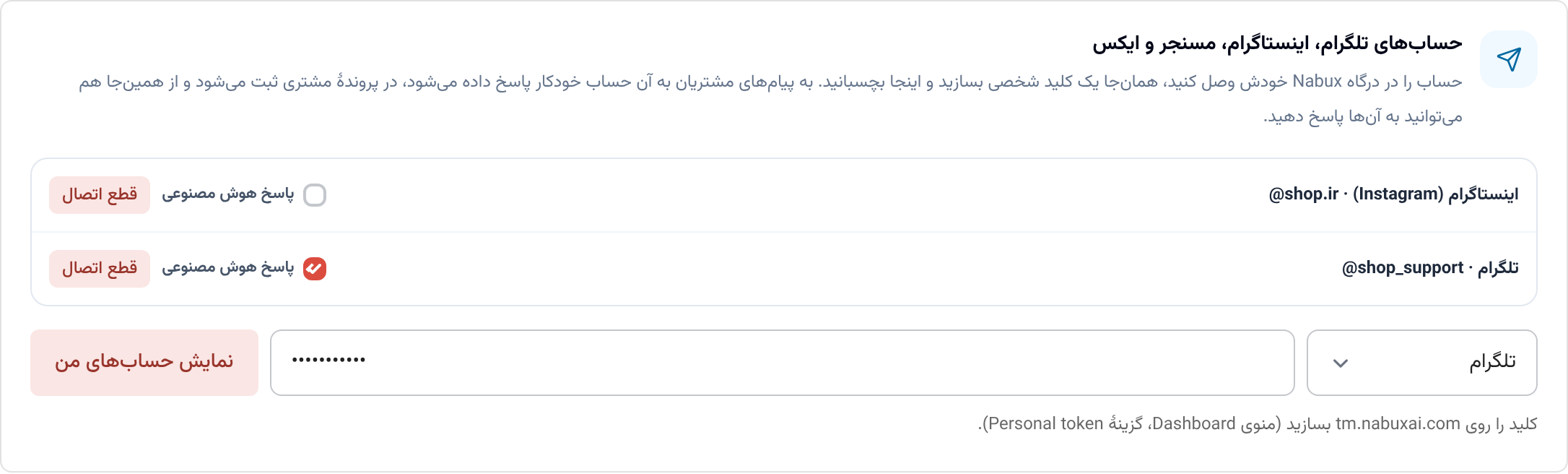
- Automatic replies. Every one-to-one message to a linked account is answered with your business's AI, keywords and rules, after a short wait so several lines in a row get one answer. Nothing is made up, and a question it cannot answer is left for a person.
- In the customer file. Each person who writes becomes a customer (or is matched to one you already have), and the conversation appears in their file and the inbox with a follow-up for your team.
- Answer from NabuDesk. A colleague's answer from the customer file goes out from the linked account. Answer from the app itself and the bot stays out of that chat for 30 minutes.
- AI on or off per account. Each linked account has its own AI answers switch, and Disconnect stops the messages without deleting the chats.
- Safe. The key and the signing secret are stored encrypted, a message without the gateway's valid signature is refused, and an account linked to one business cannot be taken by another.
How to use it
- Sign in on the gateway (tm.nabuxai.com, ig.nabuxai.com, fb.nabuxai.com or x.nabuxai.com) and connect your account there.
- Make a personal key: Dashboard → Personal token.
- In NabuDesk: Business settings → WhatsApp → Telegram, Instagram, Messenger and X accounts: pick the messenger, paste the key and connect the account.
Platform limits: Instagram and Messenger allow free text only within 24 hours of the customer's last message. X allows 15 direct messages per 15 minutes per account, and new X messages arrive within about a minute. LinkedIn is not offered: it does not open direct messages to apps.